Ok… And here is already the 2nd installment to the great DC Editor Q&A Show! I got the question “How to create airfield locations that can be placed on top of any existing landscapetypes?”. A good question and luckily a fairly easy one to answer.
Lets go to the “Location Type Window” by clicking on the “LT” button.

Here click on the “Add LocType” button. This will create a new location type. Click on it and select the statistics tab.
Now define its statistics so that it functions as the airfield we want:
-Set IsAirfield to “true” so airplanes can use it.
-Set Structural Points to 1000. This signifies the amount of damage it can stand. Keep in mind that a damaged airfield reduces the readiness of aircraft present on it.
-Set Destruct LT to -2 (***dont morph***). This means if the airfield is destroyed the landscape type of the hex will not be changed.
-Set TopAirStack to 100 meaning you can stack about a 100 airplanes on the airfield before you get penalties.
-Set AutoRecoverPoints to 200 so that any possible damage is slowly repaired (by invisible work crews)
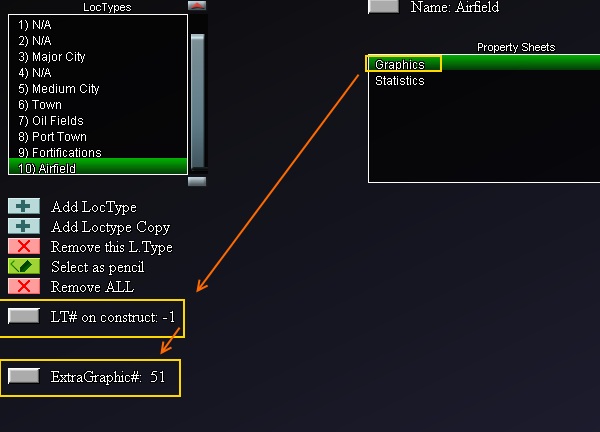
Now click the graphics tab and set the LT# on construct (Landscape Type #) to -1. This means when you place it on the map in the editor the current landscape type of the hex will not change. However we do want to give the user a visual cue and for this we set the ExtraGraphic to 51 (aircraft symbol).
Ohh.. and don’t forget to change the name to “airfield” :)
But thats basically it.
One last remark: The ExtraGraphic uses a number that corresponds with a file from the natocounter directory. In retrospect this is not ideal, but it is workable. If you would like to add a custom graphic it means you have 2 things you can do. (1) Add a new natographic in the dccbmodgraphics/natocounters/ directory. At this moment i would add it as 183.png. (2) basically you do the same but this is more clean. Here you copy all dccbmodgraphics directories and rename them something like mymodgraphics, mymodgraphicsSMALL, mymodgraphicsBIG. Then you add 183.png to the natocounters directories in these mymodgraphics directories. And then you go the settings window and set the GfxOverrule to mymodgraphics.
Hope this helps. Let me know if there any questions.

This is all fine and dandy, but after creating this airfield how do you add it to the map?
Two methods:
1. You click the select as pencil button in the last screenshot, return to the map and click on a hex.
2. You return to the map. Click the big “Pick Draw Type” button, select the category location types in the popup and select airfield, then press ok and click on a hex.
best,
Vic