Welcome to the first installment of the DC Editor Q&A show. The question thats handeled in this post is how to code an event that makes the Germans suffer losses due to winter circumstances.
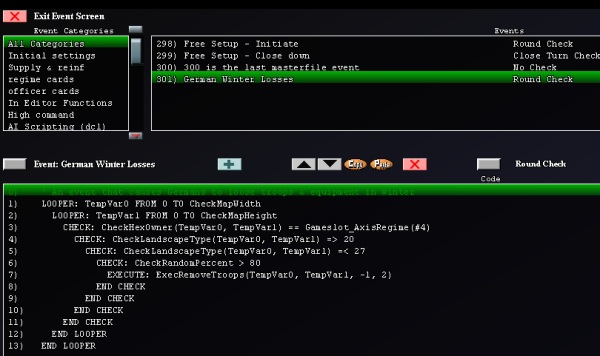
First of all: When making a new event use a number that is not yet defined. In the case of the above example event I create event number 301. This is because now when i save my modified version of the scenario it is easier to update it later. Imagine VR Designs patches the game and makes changes to the scenarios… You can now easily patch your scenario by loading the original new updated “vanilla” scenario as a masterfile. Events 0-300 will then be reloaded, but not our event 301.
Anyway this lesson is on this specific event. Appart from the code you I would look to point out i put the event i created on “round check”. This means the event will be run 1 time per round.
The code is quite straightforward:
0)    ' An event that causes Germans to loose troops & equipment in winter

1    LOOPER: TempVar0 FROM 0 TO CheckMapWidth

2      LOOPER: TempVar1 FROM 0 TO CheckMapHeight

3        CHECK: CheckHexOwner(TempVar0, TempVar1) == Gameslot_AxisRegime(#4)

4          CHECK: CheckLandscapeType(TempVar0, TempVar1) => 20

5            CHECK: CheckLandscapeType(TempVar0, TempVar1) =< 27
6              CHECK: CheckRandomPercent > 80

7                EXECUTE: ExecRemoveTroops(TempVar0, TempVar1, -1, 2)

8              END CHECK

9            END CHECK

10         END CHECK

11       END CHECK

12     END LOOPER

13   END LOOPER
Line 1+2 make us loop through every hex on the map. Temvar0 stores the X value of a hex and Tempvar1 stores the Y value of a hex. Line 12+13 close this looping operation.
Line 3 checks if a hex is in German controll. If it is line 4 will be executed.
Line 4 checks the LandscapeType # of the hex. If it is higher or equal than 20 we continue to line 5.
Line 5 checks the LanscapeType # again this time checking if it is lower or equal than 27. If it is we continue to line 6.
So we arrive only at line 6 if we find a German owned hex with a Landscape Type # in the range 20-27. Note that these Landscape Types (as you can check in the editor “Landscape Type Window” (“land” button)) are snow covered winter landscapes.
Line 6 checks the RandomPercent function which returns a random number between 0 and 100. If this number is higher then 80 we continue to line 7. Basically there is only 20% chance thuswise that we reach Line 7.
Line 7 now actually makes the winter casualties and losses. The ExecRemoveTroops function has 4 arguments: X, Y, SFTypeGroup, Percentage. As you can see we specify tempvar0 and tempvar1 for the coordinates since they store the x,y coordinates of the hex we are checking at any moment within the big loop (line 1+2 and 12+13). The SFTypeGroup (also known as unitgroup elsewhere, unitgroup and sftypegroup are the same thing) is set to -1 meaning all type of troops will be affected ( if i would have put 0 here only infantry trooptypes would have been affected). The percentage is set to 2% meaning that 2% of all troops will be removed.
Notice i use line 6 and line 7 in combination to reach an average casualty rate due to winter of 2% of 20% = 0,4% per round. Considering there are probably over a 50 winter turns this is actually still set way to high in this example. I think 5% total winter losses over all months would be more realistic in 1942-1943 so.. I should have set Line 6 more to something like CheckRandom > 96…
Line 8 – 11 has the corresponding END CHECKS to the CHECKS in lines 4-7.
A nicer version of this event would also log the affected units and output a message to the German player notifiying him which units had problems with the icy weather.
A nicer version of this event could also use different percentages of losses for troops and equipment.
I hope you’all learned something from this example. See you again in the next installment of the DC Editor Q&A. Feel free to give suggestion what the topic should be.