Welcome back to the editor Q&A. Weather and seasons is something you might want to implement your self or maybe you like to finetune the current weather and seasons in the Case Blue vanilla scenarios? In either case you will be helped by understanding how they are currently scripted and defined.
3 different parts of the editor work together here: First there are a number of events. Second there is a stringlist and third each hex on the map has a slot value assigned.
Lets start with the easiest part. The slot values. Click on Pick Draw Type button in the map window and then select “slots” and then “3) Season delay” and then select a value of choice in the rightmost column and press “OK”.
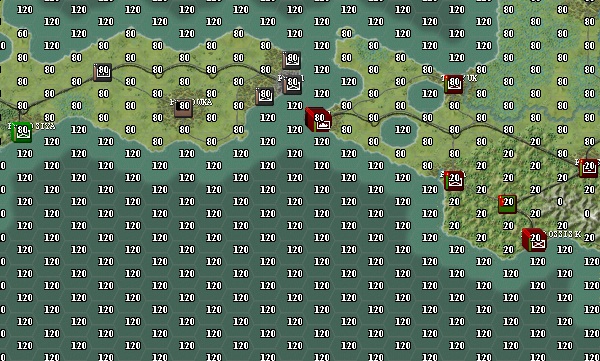
On each hex you’ll now see the current “Season delay”. These values will be read and used in the weather events which we’ll discuss later. The number on a hex is basically the delay in days for the onset of winter weather. As you can see on the map high mountains have 0 delay, low mountains 20 delay, plains about 80 delay. But we are quite far south and the more north you go the lower the delay will become untill it reaches 0. The reason for this whole excercises is to have the winter slowly drop over the map from North to South (and mountain areas earlier than plains). I could have chosen to make the whole map change from one round to the next but I think this feels more realistic. (tip: right clicking on the map allows you to select a hex without changing it)
Now lets go the stringlist. Go to the stringlist window (button next to ‘string’ text). Here in the left list box click on the stringlist “Landscape Season Matrix”.
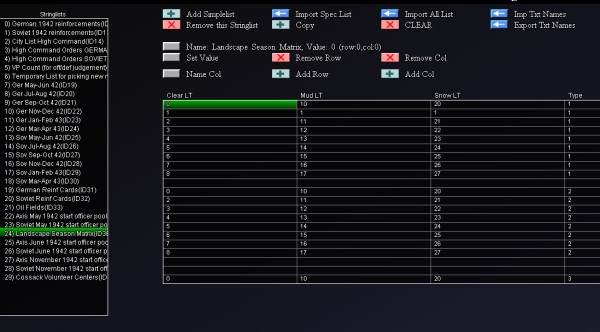
Stringlists are basically comparable to rudimentary excell sheets (and can be exported and imported from CSV files). This stringlist (ID=36) is used by the weather events to change the landscape type of hex based upon the current weather situation of the hex. There are 3 possibilities: Clear , Mud or Snow. If you look at the row number equal to the current landscape type # of the hex you can look up the landscape type # it has to change to for each of these cases.
So there is some data kept in the slots of the hexes and in a stringlist, but the meat of the weather and season functionality is in the events. Please go to the events window and select the “weather” category.
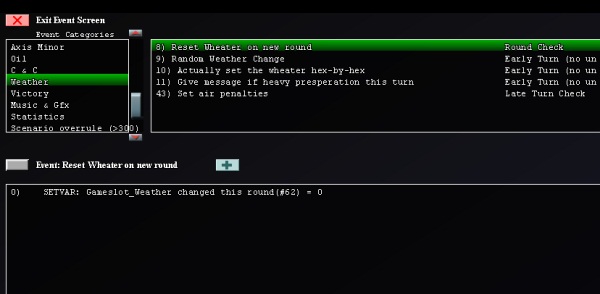
Here we have 5 events. Lets discuss them all.
Event 8 has only 1 line and at the start of a round (just before the start of the first turn) it resets the gameslot_weather_changed_this_round to value 0.
Event 9 now is going to determine if it will be a rain or snow turn.
0)    CHECK: Gameslot_Disable Weather(#67) < 1
1)      CHECK: Gameslot_Weather changed this round(#62) < 1
2)        CHECK: CheckTurn == 0
3)          SETVAR: Gameslot_Weather changed this round(#62) = 1
4)        END CHECK
5)        CHECK: CheckTurn == 1
6)          SETVAR: Gameslot_Weather changed this round(#62) = 0
7)        END CHECK
8)        ' if changed = 1 go
9)        CHECK: Gameslot_Weather changed this round(#62) == 1
10)         SETVAR: TempVar1 = CheckRandomPercent
11)         SETVAR: TempVar9 = CheckRandomPercent
12)         SETVAR: TempVar9 / 10
13)         SETVAR: TempVar9 + 1
14)         CHECK: TempVar1 < 33
15)           SETVAR: Gameslot_Weather Random Change(#61) - TempVar9
16)         END CHECK
17)         CHECK: TempVar1 > 66

18)           SETVAR: Gameslot_Weather Random Change(#61) + TempVar9

19)         END CHECK

20)         CHECK: Gameslot_Weather Random Change(#61) > 14

21)           SETVAR: Gameslot_Weather Random Change(#61) = 14

22)         END CHECK

23)         CHECK: Gameslot_Weather Random Change(#61) < -14
24)           SETVAR: Gameslot_Weather Random Change(#61) = -14
25)         END CHECK
26)         SETVAR: Gameslot_Presperation Last Round?(#29) = Gameslot_Presperation Round(#63)
27)         SETVAR: Gameslot_Presperation Round(#63) = 0
28)         CHECK: Gameslot_Disable Weather(#67) < 1
29)           CHECK: CheckRound > 1

30)             CHECK: CheckRandomPercent < 25
31)               CHECK: Gameslot_Presperation Last Round?(#29) < 1
32)                 SETVAR: Gameslot_Presperation Round(#63) = 1
33)               END CHECK
34)             END CHECK
35)           END CHECK
36)         END CHECK
37)       END CHECK
38)     END CHECK
39)   END CHECK
In line 0 we check if the weather rules have not been disabled, which can be the case if a variant in the scenario setup screen is enabled by the player.
The next lines in this algorithm are actually quite ugly (and I should recode them) but basically have as effect that only in turn 0 the weather can change.
In Lines 10-25 the Gameslot_Weather Random Change is increased or decreased with max 10. The resulting value can max be +14 or minimally be -14. The Gameslot_Weather Random Change will be used in the next event to determine the actual landscape state of a hex.
The remaining lines determine if this is a snow/rain round by possibly setting Gameslot_Presperation Round to 1. Observe that i added extra code here remembering the presperation state of the last round to make sure we never have 2 rain/snow rounds in a row.
Event 10 is the most important and longest event. Here the first part of the code in this event:
0)    CHECK: Gameslot_Weather changed this round(#62) == 1

1)      SETVAR: Gameslot_Weather changed this round(#62) = 2

2)      ' we just set that gameslot to 2 so its only changed once every round

3)      SETVAR: TempVar3 = -90

4)      CHECK: CheckMonth == 10

5)        SETVAR: TempVar3 = -15

6)        SETVAR: TempVar3 + CheckDay

7)        SETVAR: TempVar3 + Gameslot_Weather Random Change(#61)

8)      END CHECK

9)      CHECK: CheckMonth == 11

10)       SETVAR: TempVar3 = 15

11)       SETVAR: TempVar3 + CheckDay

12)       SETVAR: TempVar3 + Gameslot_Weather Random Change(#61)

13)     END CHECK

14)     CHECK: CheckMonth == 12

15)       SETVAR: TempVar3 = 45

16)       SETVAR: TempVar3 + CheckDay

17)       SETVAR: TempVar3 + Gameslot_Weather Random Change(#61)

18)     END CHECK

19)     CHECK: CheckMonth == 1

20)       SETVAR: TempVar3 = 75

21)       SETVAR: TempVar3 - Gameslot_Weather Random Change(#61)

22)     END CHECK

23)     CHECK: CheckMonth == 2

24)       SETVAR: TempVar3 = 75

25)       SETVAR: TempVar3 - CheckDay

26)       SETVAR: TempVar3 - Gameslot_Weather Random Change(#61)

27)     END CHECK

28)     CHECK: CheckMonth == 3

29)       SETVAR: TempVar3 = 45

30)       SETVAR: TempVar3 - CheckDay

31)       SETVAR: TempVar3 - Gameslot_Weather Random Change(#61)

32)     END CHECK

33)     CHECK: CheckMonth == 4

34)       SETVAR: TempVar3 = 15

35)       SETVAR: TempVar3 - CheckDay

36)       SETVAR: TempVar3 - Gameslot_Weather Random Change(#61)

37)     END CHECK

38)     SETVAR: TempVar3 + Gameslot_Weather Random Change(#61)
In Line 1-3 we make sure this event is only executed once a round. Since after executing once the Gameslot_Weather changed this round(#62) = 2 will cause it not to be again untill next round causes event 8 to be executed again.
Now the remaining lines determine the value of tempvar3 (tempvars are only remembered within an event execution).
Tempvar 3 will be set to 75 in the heart of winter and will be set lower, dropping to 0 if earlier in winter and the same if later in winter.
Oktober 16 is the first day to have a higher than 0 tempvar3 value and April 15 the first day to reach 0 again.
You can observe that the in the previous event randomized Gameslot_Weather Random adds some variablity to the onset of winter. (although admittedly not on the end date as i have to admit now i review this event again - i think line 38 should be removed from this event to make it work as intended - always good to find a small glitch to patch)
Anywo we no have a tempvar 3 value set. Lets continue analysing this event 10.
39)     ' and now go hex-by-hex:

40)     LOOPER: TempVar0 FROM 0 TO CheckMapWidth

41)       LOOPER: TempVar1 FROM 0 TO CheckMapHeight

42)         '

43)         SETVAR: TempVar4 = TempVar3

44)         SETVAR: TempVar9 = CheckSlot(TempVar0, TempVar1, 3)

45)         SETVAR: TempVar9 / 2

46)         SETVAR: TempVar4 - TempVar9

47)         SETVAR: TempVar5 = CheckLandscapeType(TempVar0, TempVar1)

48)         SETVAR: TempVar6 = CheckStringList(36, TempVar5, 3)

49)         '

50)         CHECK: TempVar6 == 1

51)           CHECK: TempVar4 > 0

52)             CHECK: TempVar9 < 50
53)               ' summer landscape and its freezing now
54)               SETVAR: TempVar7 = CheckStringList(36, TempVar5, 2)
55)               EXECUTE: ExecSetLandscape(TempVar0, TempVar1, TempVar7)
56)               EXECUTE: ExecSetSlot(TempVar0, TempVar1, 4, 1)
57)             END CHECK
58)           END CHECK
59)           CHECK: TempVar4 < 1
60)             ' summer stays summer, unless presperation round
61)             CHECK: Gameslot_Presperation Round(#63) => 1

62)               SETVAR: TempVar7 = CheckStringList(36, TempVar5, 1)

63)               EXECUTE: ExecSetLandscape(TempVar0, TempVar1, TempVar7)

64)               EXECUTE: ExecSetSlot(TempVar0, TempVar1, 4, 1)

65)               EXECUTE: ExecChangeRoad(TempVar0, TempVar1, 0, 3)

66)               EXECUTE: ExecChangeRoad(TempVar0, TempVar1, 1, 4)

67)               EXECUTE: ExecChangeRoad(TempVar0, TempVar1, 2, 5)

68)             END CHECK

69)           END CHECK

70)         END CHECK

71)         '

72)         CHECK: TempVar6 == 2

73)           CHECK: TempVar4 > 0

74)             ' mud landscape and it is freezing now

75)             CHECK: TempVar9 < 50
76)               SETVAR: TempVar7 = CheckStringList(36, TempVar5, 2)
77)               EXECUTE: ExecSetLandscape(TempVar0, TempVar1, TempVar7)
78)               SETVAR: TempVar8 = CheckSlot(TempVar0, TempVar1, 4)
79)               SETVAR: TempVar8 + 1
80)               SETVAR: TempVar8 = CheckMin(TempVar8, 8)
81)               EXECUTE: ExecSetSlot(TempVar0, TempVar1, 4, TempVar8)
82)               EXECUTE: ExecChangeRoad(TempVar0, TempVar1, 3, 0)
83)               EXECUTE: ExecChangeRoad(TempVar0, TempVar1, 4, 1)
84)               EXECUTE: ExecChangeRoad(TempVar0, TempVar1, 5, 2)
85)             END CHECK
86)           END CHECK
87)           CHECK: TempVar4 < 1
88)             CHECK: Gameslot_Presperation Round(#63) < 1
89)               ' mud becomes summer
90)               SETVAR: TempVar8 = CheckSlot(TempVar0, TempVar1, 4)
91)               SETVAR: TempVar8 - 1
92)               SETVAR: TempVar8 = CheckMax(TempVar8, 0)
93)               EXECUTE: ExecSetSlot(TempVar0, TempVar1, 4, TempVar8)
94)               CHECK: TempVar8 < 1
95)                 SETVAR: TempVar7 = CheckStringList(36, TempVar5, 0)
96)                 EXECUTE: ExecSetLandscape(TempVar0, TempVar1, TempVar7)
97)                 EXECUTE: ExecChangeRoad(TempVar0, TempVar1, 3, 0)
98)                 EXECUTE: ExecChangeRoad(TempVar0, TempVar1, 4, 1)
99)                 EXECUTE: ExecChangeRoad(TempVar0, TempVar1, 5, 2)
100)              END CHECK
101)            END CHECK
102)          END CHECK
103)        END CHECK
104)        '
105)        CHECK: TempVar6 == 3
106)          CHECK: TempVar4 > 0

107)            ' snow landscape and it is still  freezing now

108)            SETVAR: TempVar8 = CheckSlot(TempVar0, TempVar1, 4)

109)            SETVAR: TempVar8 + 1

110)            SETVAR: TempVar8 = CheckMin(TempVar8, 8)

111)            EXECUTE: ExecSetSlot(TempVar0, TempVar1, 4, TempVar8)

112)            CHECK: TempVar8 > 7

113)              EXECUTE: ExecChangeRiver(TempVar0, TempVar1, 0, 4)

114)            END CHECK

115)            CHECK: TempVar8 > 5

116)              EXECUTE: ExecChangeRiver(TempVar0, TempVar1, 1, 5)

117)            END CHECK

118)            CHECK: TempVar8 > 1

119)              EXECUTE: ExecChangeRiver(TempVar0, TempVar1, 2, 6)

120)            END CHECK

121)            CHECK: TempVar8 > 3

122)              EXECUTE: ExecChangeRiver(TempVar0, TempVar1, 3, 7)

123)            END CHECK

124)          END CHECK

125)          CHECK: TempVar4 < 1
126)            ' snow becomes mud
127)            SETVAR: TempVar8 = CheckSlot(TempVar0, TempVar1, 4)
128)            SETVAR: TempVar8 - 1
129)            SETVAR: TempVar8 = CheckMax(TempVar8, 0)
130)            EXECUTE: ExecSetSlot(TempVar0, TempVar1, 4, TempVar8)
131)            SETVAR: TempVar7 = CheckStringList(36, TempVar5, 1)
132)            EXECUTE: ExecSetLandscape(TempVar0, TempVar1, TempVar7)
133)            EXECUTE: ExecChangeRoad(TempVar0, TempVar1, 0, 3)
134)            EXECUTE: ExecChangeRoad(TempVar0, TempVar1, 1, 4)
135)            EXECUTE: ExecChangeRoad(TempVar0, TempVar1, 2, 5)
136)            EXECUTE: ExecChangeRiver(TempVar0, TempVar1, 7, 3)
137)            EXECUTE: ExecChangeRiver(TempVar0, TempVar1, 6, 2)
138)            EXECUTE: ExecChangeRiver(TempVar0, TempVar1, 5, 1)
139)            EXECUTE: ExecChangeRiver(TempVar0, TempVar1, 4, 0)
140)          END CHECK
141)        END CHECK
142)        '
143)      END LOOPER
144)    END LOOPER
145)  END CHECK
Line 40-41 & Line 143-144 loop the remaining code through all hexes on the map.
Then for each hex the landscape type # is noted down (Line 47), the already discussed seasonal delay of the hex is noted down (Line 44).
Tempvar3 we calculated earlier is copied in tempvar4 and tempvar4 is reduced with the seasonal delay (divided by 2) of the hex.
In Line 48 its determined if the current Landscape Type of the hex signifies clear state (value 1), mud state (value 2) or snow state (value 3).
Now based on current state of the Landscape Type 3 big code blocks remain.
Line 50-70 handle currently clear landscape types. If tempvar40 is above 0 it means the landscape type will change to its winter variant. This is done by looking up in line 54 the stringlist (ID=36) what this landscapetype morphs to when it becomes winter. The landscapetype of the hex is then actually changed in line 55. Also note that slot value 4 of the hex is set to 1 in line 56. This slot 4 keeps track of the number of snow turns a hex has experienced in a row (in order to determine how many mud turns will result when it starts melting again).
Line 61-68 deal with it staying summer but putting in effect a rain turn. If so the hex landcape type will be changed to the correct mud landscape type. Also the roads in the hex are changed to their mud variants.
Line 72-103 handles currently mud landscape types. Line 75-85 handle mud becoming winter variants. Line 88-101 handle mud trying to become summer landscape. Note here that the value in slot 4 of the hex is maximized to 8 and then decreased with 1. Only when it reaches 0 will the hex be allowed to change from mud to clear. After the end of winter this means you'll have two weeks of mud.
Line 105-140 handles snow landscape types. Interesting to note here is that if a winter hex stays winter the slot 4 is raised again. At specific values of subsequent winter rounds in the hex rivers start freezing over (small ones first, bigger ones later on).
Well... that was event 10. I hope you are able to wrap your head around it. To be honest: this is one of the most difficult events around.
Event 11 just sends a message to both players notifying them what sort of weather it is this round. Interesting here is that based on the date the eventpicture (you can define and load them in the settings window) used as an illustration for the message is changed.
Event 43 removes offensive/defensive bonusses on aircraft if clear weather and and adds them if rain/snow round. Also it diminishes the number of action points available for air units. Its quite straightforward.
I am not sure if you noticed it but as you can see not a single thing about the weather and seasonal system has been hardcoded.
I know its not easy to make something like this weather & seasons system, but if you can wrap your head around it the sky is the limit.
Obvious extensions to the current system would include a weather report in which you get a prediction of the weather the coming rounds and adding blizzard turns in winter.
And that concludes this rather extensive Q&A episode. Thank you for tuning in. See you next time!